

POST to your endpoint when an event happens in your workspace. Each request is signed with a secret that only your endpoint and Listen know, so your receiver can check that the request came from Listen.
Only workspace Admins can see and change webhook endpoints. Webhooks are turned on per workspace. If you do not see the Webhooks section, contact support@listenlabs.ai.
Set up an endpoint
1
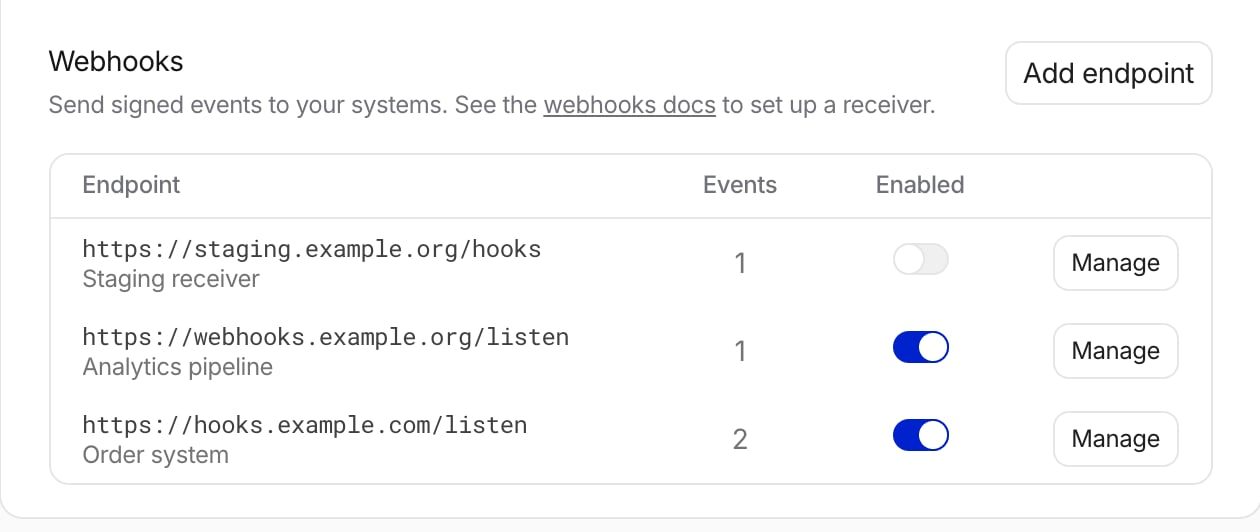
Open the Webhooks section
Click Account in the menu at the bottom of the left sidebar. The Developer card has two sections: API keys and Webhooks.
2
Add the endpoint
Click Add endpoint. Enter your receiver URL, an optional description, the events to send, and any custom headers. Listen checks the URL when you save and tells you why it refuses one. See Endpoint URL rules.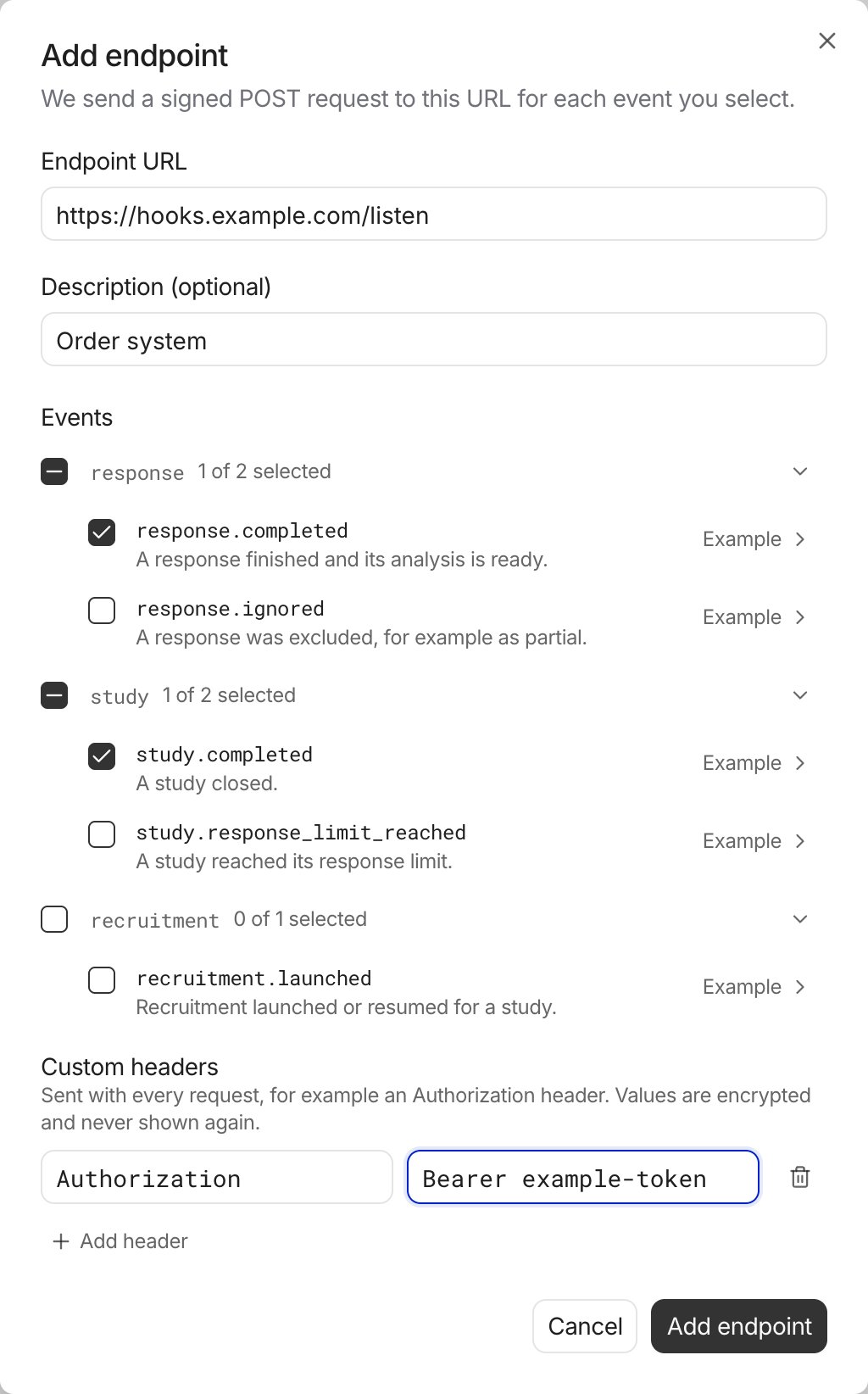
3
Copy the signing secret
The secret starts with 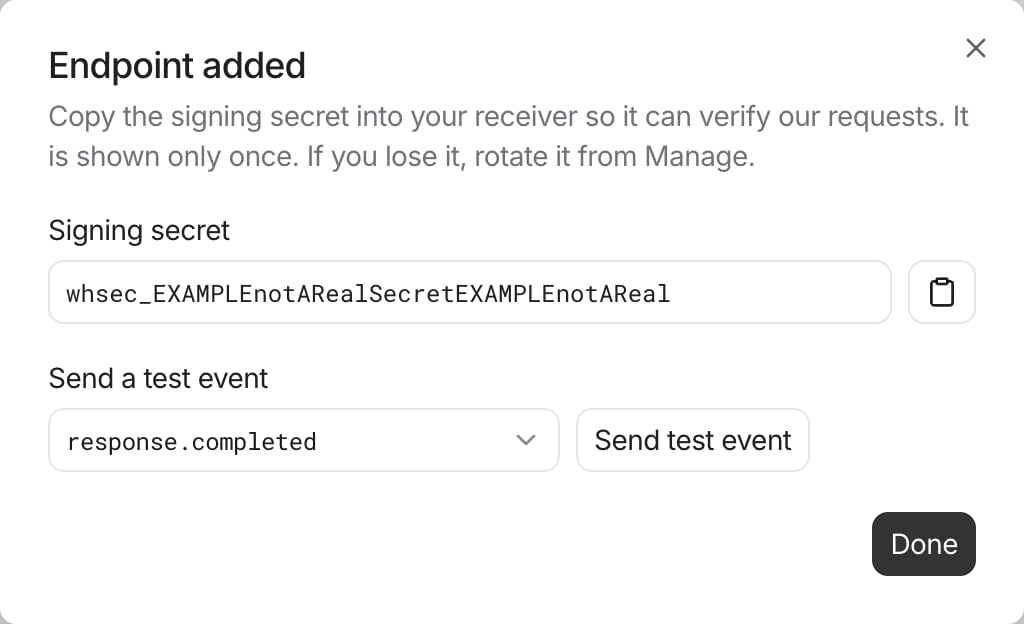
whsec_. It is shown only once. Store it in your receiver. If you lose it, click Rotate secret in Manage to get a new one.4
Send a test event
Pick an event type and click Send test event. Then open Manage and look for Delivered under Recent deliveries.
Request format
Every request has a JSON body and three headers.string
The event ID. It is also the
webhook-id header. It stays the same when Listen sends the event again, so use it to drop duplicates.number
The payload version. Currently
1.string
When the event happened, as an ISO 8601 timestamp.
string
The ID of the workspace the event belongs to. Other API pages call the workspace an organization.
boolean
true for events sent with Send test event. Test events carry placeholder IDs. Do not run real actions for them.object
The event fields. Each event type has its own shape.
Verify the signature
Listen signs every request with the Standard Webhooks scheme. Verify each request before you trust its body, and reply401 when the check fails.
Node.js (Express)
- Remove the
whsec_prefix from the secret and base64-decode the rest. This is the HMAC key. - Build the signed content:
{webhook-id}.{webhook-timestamp}.{raw body}. - Compute an HMAC-SHA256 of the signed content with the key, and base64-encode it.
- Compare it with the value after
v1,inwebhook-signature, with a constant-time compare. - Reject the request if
webhook-timestampis more than 5 minutes from your clock.
Respond and retries
Reply with a2xx status within 15 seconds. Reply first, then do slow work. The 15 seconds include the DNS lookup and the connection.
Listen sends the event again after any other result: a non-2xx status (3xx, 401 and other 4xx included), a timeout, or a connection error. It waits 5 seconds, 30 seconds, 3 minutes, 18 minutes, 1.8 hours, 10 hours and 10 hours between attempts. After 8 attempts, about 22 hours, the delivery fails and is not sent again.
To slow Listen down, add a Retry-After header to the failed reply, in seconds or as an HTTP date. Listen waits at least that long before the next attempt, up to 10 hours per wait. It never retries sooner than the schedule above, and the delivery still gets at most 8 attempts.
- Listen does not follow redirects. Save the final URL.
- A retry has the same
webhook-idand body, with a new timestamp and signature. - Events can arrive out of order. For example,
response.ignoredcan arrive beforeresponse.completedfor the same response. - Events that happen while an endpoint is switched off are never sent.
- If every delivery to an endpoint fails for 5 days, Listen switches the endpoint off. The Webhooks section shows this. Fix your receiver, then switch the endpoint on again.
Endpoint URL rules
- The URL uses
httpson port443or8443. - The host is on the public internet. Listen does not send to private or loopback addresses, or to hosts that resolve to them.
- The server has a valid certificate from a public certificate authority.
- The host is not a Listen Labs host.
- The URL has no username or password, and is at most 2048 characters.
Custom headers
Add up to 10 headers that Listen sends with every request to the endpoint, for exampleAuthorization: Bearer <token>.
- Listen encrypts header values and never shows them again. To change a value, type a new one. To remove a header, delete its row.
- If you change the URL, enter every header value again. Listen sends a saved value only to the URL it was saved for.
- Names follow HTTP rules and are unique, ignoring case. Values are printable ASCII, up to 2048 characters.
- These names are reserved:
Host,Content-Type,Content-Length,Transfer-Encoding,Connection,Keep-Alive,Upgrade,TE,Trailer,Expect,User-Agent, and any name that starts withwebhook-,proxy-orsec-. The same names written with_in place of-are reserved too.
Events
An endpoint receives only the event types selected for it. Events for restricted studies are never sent.
response.completed
Sent once per response, when a qualified response is complete and its analysis has finished.completedAtis when the analysis finished, not when the participant left the interview.studyLinkIdis the study’slinkId, the one Get Responses takes.resourceUrlreturns the transcript, URL parameters and summary. Call it with an API key from the same workspace in thex-api-keyheader. See Get Single Response. It isnullwhen the study has no study link.
response.ignored
Sent when a response is hidden from the study’s results, by a member of your workspace with Hide Response or by Listen. Hidden responses are left out of Search Responses unlessincludeHidden=true.
ignoreReasonis one offraud,video_quality,response_quality,testing,partial,hidden_by_non_superadmin,restarted, ornull.hidden_by_non_superadminmeans a member of your workspace hid the response.- It can be sent for a response that never got
response.completed, for example a partial response. - No event is sent when a response is unhidden.
study.completed
Sent when a study closes, by hand or because it reached its response limit. It is not sent when you close a paused study, because a pause already marks the study closed. It is sent again if the study is reopened and closed again.totalResponsescounts qualified responses that are not hidden, including responses still in progress. It is not the number of completed responses.incidenceRateis qualified responses divided by qualified plus screened-out responses, ornull.
study.response_limit_reached
Sent when a study reaches its response limit and closes. Astudy.completed event is sent at the same time. It is not sent if the study was paused when it reached the limit.
recruitment.launched
Sent when panel recruitment launches or resumes for one target group of a study. A study with several target groups sends one event per group. Share links, custom links and email recruitment send no event.Test events
Send test event sends one event of the chosen type to one endpoint, withisTest: true. The endpoint must be switched on and subscribed to that type. Its IDs are placeholders, so its resourceUrl finds no response. A test makes one attempt and is not retried. Each endpoint allows 5 test events a minute, and each workspace 20.
Delivery log
Manage shows the last 50 deliveries of an endpoint from the past 30 days, with the status, the number of attempts and the last result.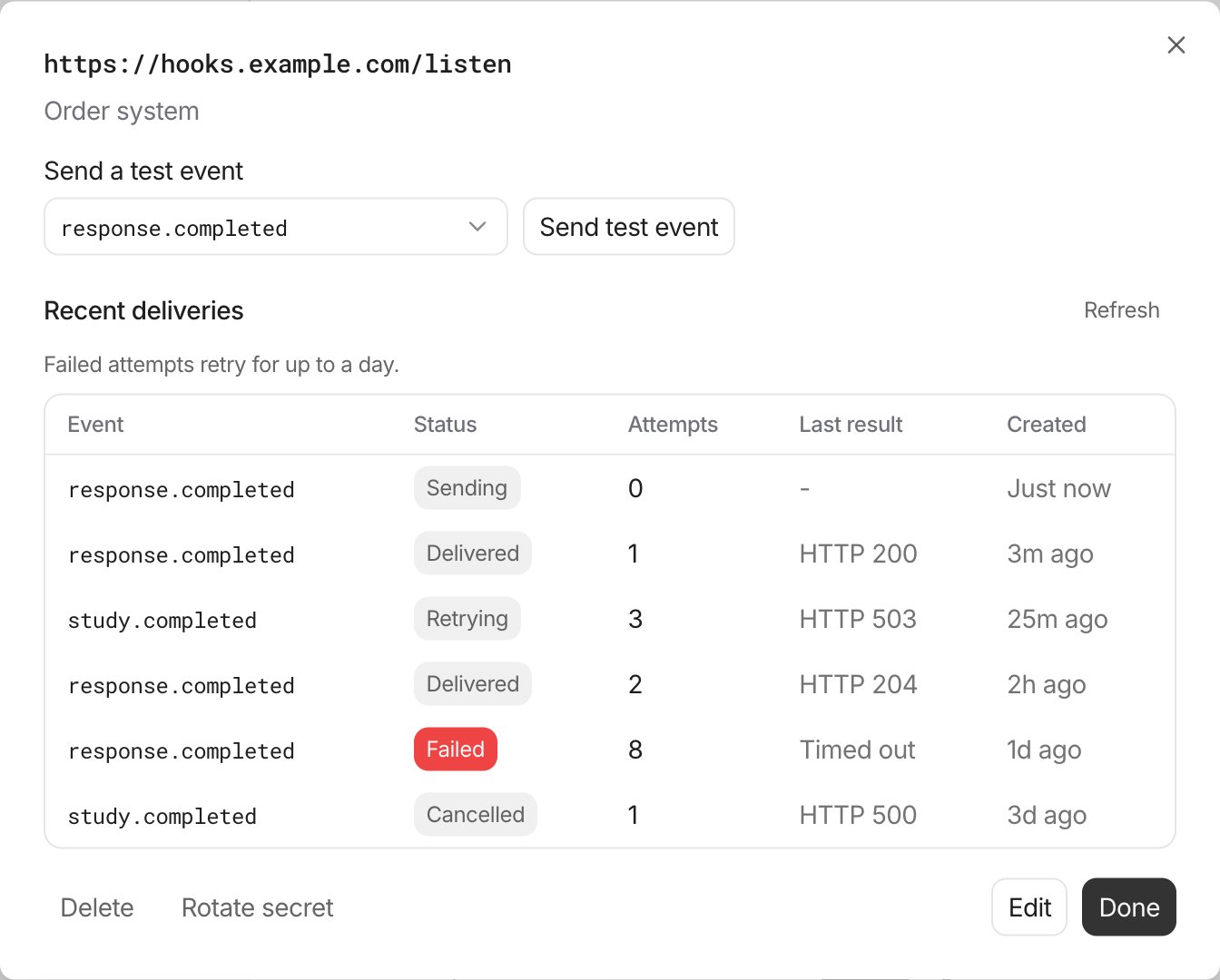
Delivered means your receiver replied
2xx. Listen cannot see whether your receiver checked the signature.